As your business grows, the number of customer conversations also increases. What starts as a few daily messages can quickly turn into dozens or even hundreds of chats that need attention.
Handling all of this manually becomes difficult. Responses get delayed, messages are missed, and conversations lose direction. This not only affects customer experience but also leads to missed business opportunities.
This is where workflows become important.
With WPLeads, businesses can create structured workflows that guide conversations automatically. Instead of reacting to messages, you build a system that handles them in a consistent and organized way.
What is a WhatsApp automation workflow
A workflow is a predefined path that a conversation follows.
Instead of typing different replies every time, you define how the conversation should move from one step to the next. When a user sends a message, the system responds instantly based on the workflow you have created.
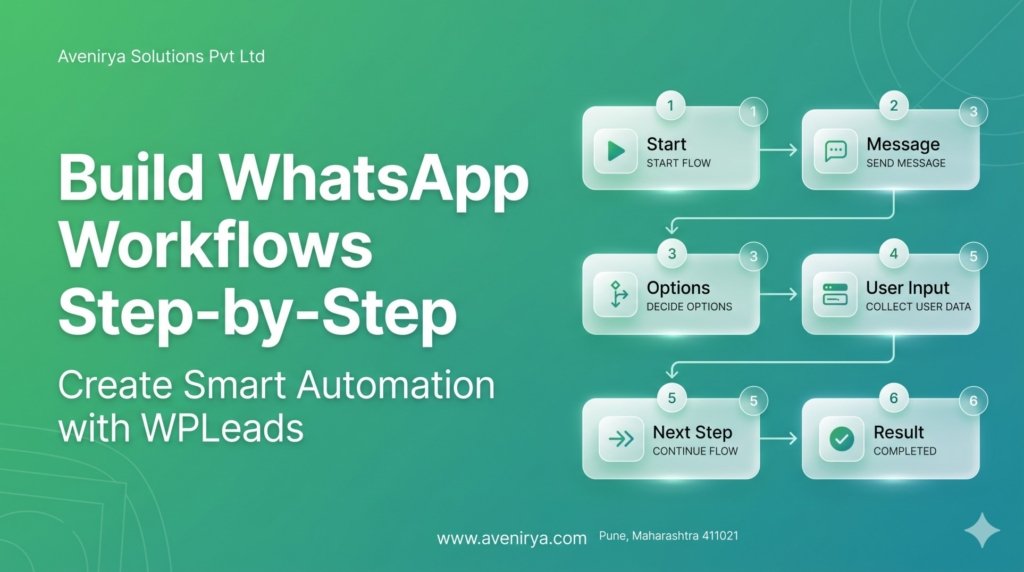
For example, a simple workflow can start with a greeting, followed by options for the user to choose from. Based on the user’s selection, the conversation continues in a specific direction.
This removes randomness and creates a clear, guided experience.
Why workflows are important for businesses
Without workflows, conversations depend entirely on manual handling. This creates inconsistency because different responses may be given at different times.
Workflows solve this by bringing structure to communication.
They ensure that:
- every user gets a response
- conversations follow a clear direction
- important steps are not missed
This improves both efficiency and reliability. Customers get faster responses, and businesses get better control over interactions.
How WPLeads makes workflow creation simple
WPLeads is designed to simplify the process of building workflows.
Instead of needing technical knowledge, businesses can define conversation steps in a straightforward way. You decide how the conversation starts, what options are shown, and how users move through each stage.
This allows businesses to focus on the logic of the conversation rather than the technical setup.
The result is a system that works in the background while you focus on customers and growth.
Step-by-step: Building a workflow in WPLeads
Step 1: Define your goal
Every workflow should start with a clear purpose. This could be capturing leads, answering common questions, or guiding users toward a specific action.
When the goal is clear, the workflow becomes easier to design and more effective.
Step 2: Set the starting point
A workflow always begins with a trigger. This is usually when a user sends a message or interacts with your business.
The first response should be immediate and clear. It should tell the user what to expect and what they can do next.
Step 3: Create guided responses
Instead of leaving the conversation open-ended, guide the user with clear options.
This helps users move forward without confusion. It also ensures that the conversation stays aligned with your goal.
A guided structure makes interactions smoother and easier to manage.
Step 4: Build conversation flow
Each step in the workflow should lead to the next logical step.
For example, if a user shows interest, the next step can provide more information or ask for details. If the user has a query, the workflow can guide them to the right answer.
This creates a continuous flow instead of disconnected messages.
Step 5: Capture important information
At the right stage, the workflow should collect key details from the user.
This could include basic information that helps you understand the user’s needs. Capturing this data in a structured way improves lead quality and follow-up.
Step 6: Define the outcome
Every workflow should end with a clear result.
This could be:
- completing a conversation
- moving the user to the next step
- or continuing interaction in another flow
A defined outcome ensures that conversations do not end without purpose.
How workflows improve business performance
Workflows improve performance by making communication faster and more organized.
When responses are automated and structured, businesses can handle more conversations at the same time without losing quality.
This reduces delays, improves user experience, and ensures that every interaction has direction.
Instead of reacting to each message, businesses operate with a system that works continuously.
Connecting workflows with lead generation
Workflows play a major role in lead generation.
They allow businesses to guide users through a process where interest is identified and information is collected naturally within the conversation.
Instead of asking random questions, the workflow ensures that each step contributes to understanding the user and moving them forward.
This makes lead generation more consistent and less dependent on manual effort.
Why workflows are essential as you scale
As your business grows, manual communication becomes harder to manage.
More messages mean more chances of delays and missed opportunities.
Workflows solve this by maintaining consistency even at higher volumes.
With WPLeads, businesses can scale their communication without increasing workload. The system continues to handle conversations efficiently, regardless of volume.
Final thoughts
Workflows transform WhatsApp from a simple messaging platform into a structured business tool.
They allow businesses to manage conversations with clarity, capture leads effectively, and maintain consistent communication.
Instead of relying on manual replies, businesses can build a system that works continuously and delivers better results over time.